Table of contents:
Measurement keyboard shortcuts
Automations forms optimization
Optimization of photo loading and annotation
Disabling IFC element selection during active measurement
Correct handling of volume colors in reports
Improvements
Keyboard shortcuts have been enabled to allow quick addition of basic measurements without using the on-screen interface:
-
Pins (P)
-
Distances (L)
-
Areas (A)
-
Volumes (V)
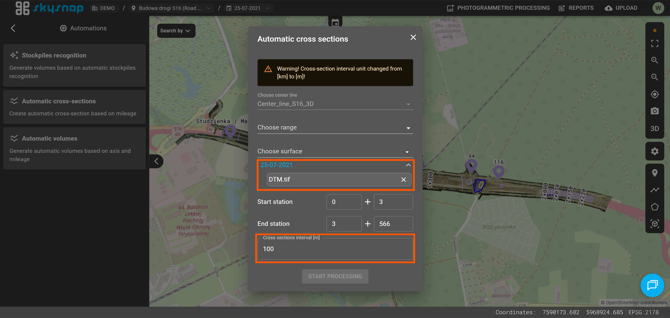
Automations forms optimization
The interval unit for automatic cross-sections and volumes has been changed from kilometers [km] to meters [m]. The readability of surface selection lists has been improved by grouping them according to the upload level and date. Shared layers are highlighted at the top of the list. The date of the layer group for the currently displayed project is highlighted in blue.
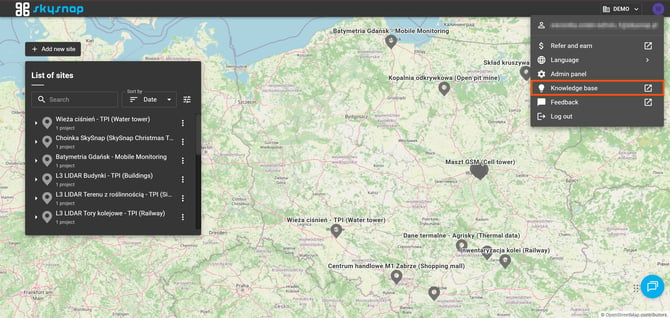
Knowledge base access
Direct access to the SkySnap knowledge base has been provided from the dropdown menu under the user avatar.
Disabling IFC element selection during active measurement
The ability to select IFC elements while taking a measurement has been disabled, preventing unintended interactions.
Changes
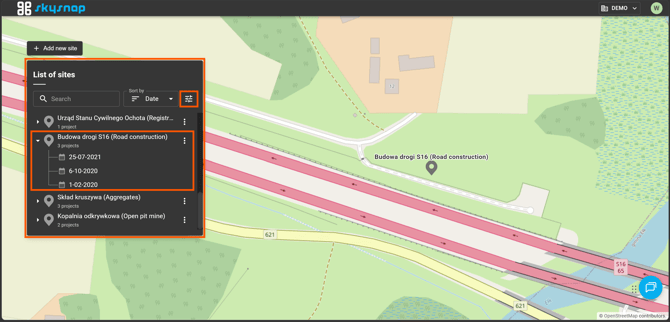
New home page appearance
The home view has been refreshed to make navigation easier for new portal users. The investment panel has been widened and given a clear title, while view settings have been gathered in one place. A clearer project hierarchy has also been introduced through the use of guiding lines and calendar icons that align with the project view.